



Introduction
Every successful SEO strategy starts with the right keywords. Before writing a blog post, creating a landing page, or launching a marketing campaign, you need to know what your audience searches for on Google.
Google Keyword Planner is one of the best free tools for keyword research. Although Google designed it for advertisers and SEO beginners also use it to discover valuable keyword opportunities.
In this guide, you’ll learn how to access Google Keyword Planner, research keywords, understand its metrics, and choose keywords that help your content reach the right audience.
Why Use Google Keyword Planner?
Google Keyword Planner provides keyword data directly from Google, making it a reliable tool for research.
It helps you:
- Discover new keyword ideas
- Check monthly search volume
- Find long-tail keywords
- Plan SEO content
- Prepare Google Ads campaigns
Even if you don’t run paid ads, you can use the tool to build a strong SEO strategy.
Why Keyword Research Matters
Keyword research helps you understand your audience before creating content. Instead of guessing what people want, you can create articles that answer real search queries.
When you choose the right keywords, you can:
- Write content that matches user intent
- Improve your Google rankings
- Increase organic traffic
- Plan better blog topics
- Reach the right audience
For example, targeting “best running shoes for beginners” gives you a better chance of ranking than using the broad keyword “shoes.”
How to Access Google Keyword Planner
Getting started takes only a few minutes.
Step 1: Create a Google Ads Account
Visit Google Ads and sign in with your Google account. If you don’t have an account, create one.
Step 2: Open Keyword Planner
After signing in:
- Click Tools
- Select Planning
- Click Keyword Planner
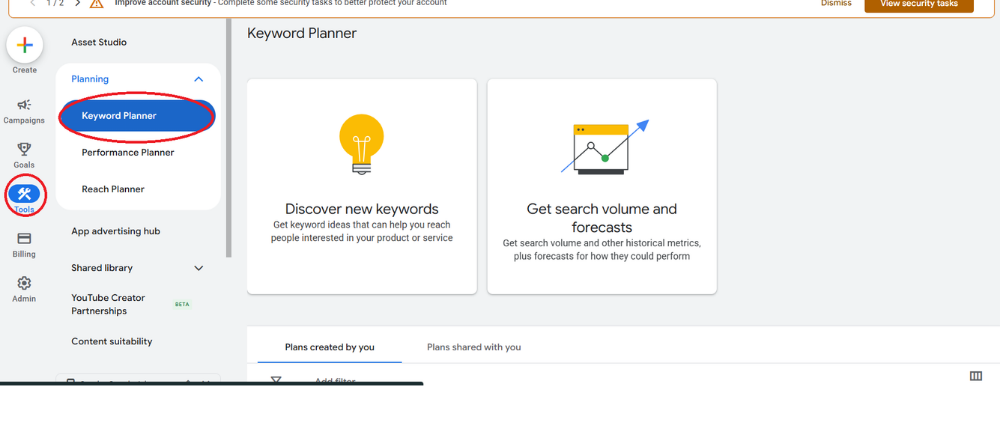
You’ll see two options:
- Discover New Keywords
- Get Search Volume and Forecasts
Understanding the Two Main Features
Discover New Keywords
Use this option when you need fresh keyword ideas.
You can:
- Enter a keyword
- Enter a website URL
- Receive related keyword suggestions
- Filter results by location and language
For example, entering a Digital Marketing Course generates hundreds of related keyword ideas.
Get Search Volume and Forecasts
Use this feature when you already have a list of keywords you want to evaluate for your SEO strategy.
It helps you understand:
- Estimated monthly search volume
- Search trends and keyword popularity
- Potential organic traffic opportunities
- Keyword competition level (where available)
- Forecasted performance and keyword potential
This data helps you identify high-potential keywords and choose the right keywords for your SEO content, blog posts, and website optimization.
How to Find Keywords Step by Step
Enter a Seed Keyword
Start with a broad topic related to your business or blog.
Examples include:
- Boutique
- Photography
- SEO
- Digital Marketing
Google will generate related keyword suggestions based on your input.
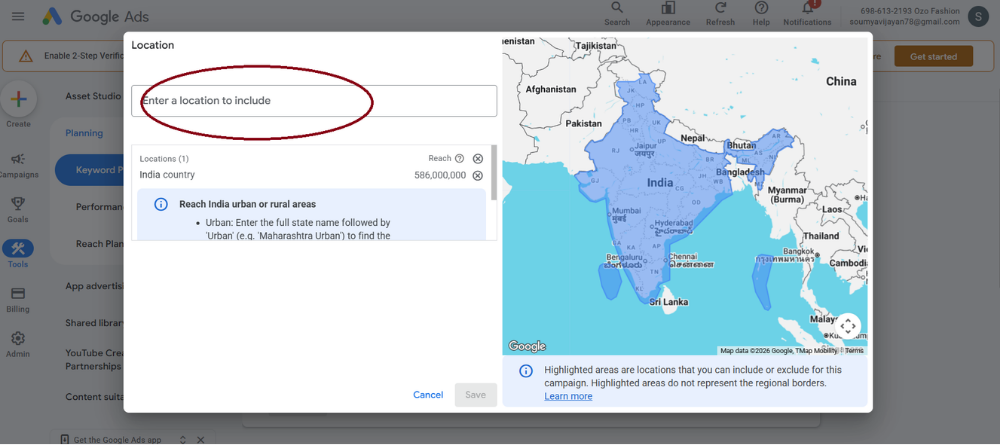
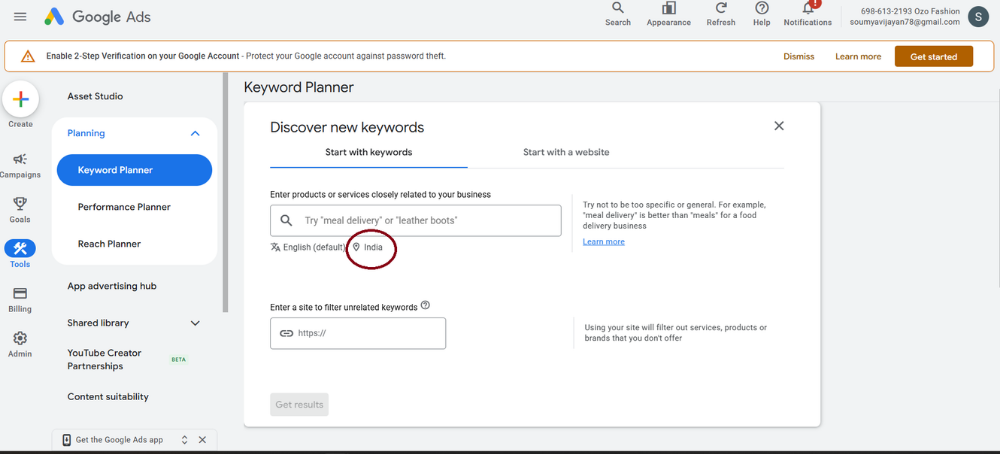
Choose Your Target Location
Select the country, state, or city where you want to reach your audience.
For example:
- India
- Kerala
- United States
Choosing the correct location gives you more relevant keyword data.
Select the Language
Choose the language your audience uses while searching.
This filter improves the accuracy of your results.
Apply Filters
Filters help you remove irrelevant keywords.
You can filter results by:
- Search volume
- Competition
- Keyword text
Review the Results
Study the keyword list carefully.
Prioritize keywords that:
- Match your topic
- Show consistent search demand
- Have low or medium competition
- Support your content goals
Save useful keywords for future articles or campaigns.
Understanding Keyword Metrics
Google Keyword Planner displays several important metrics that help you evaluate keywords.
Average Monthly Searches
This metric estimates how often people search for a keyword each month.
Higher search volume often means greater traffic potential, but it may also bring stronger competition.
Competition
Competition measures advertiser demand rather than SEO difficulty.
Beginners often benefit from targeting keywords with low or medium competition because they are generally easier to compete for.
Top of Page Bid
This value estimates how much advertisers pay for clicks.
Higher bids usually indicate stronger commercial intent.
Search Trends
Review trends before selecting keywords.
Growing or seasonal keywords can help you publish content at the right time.
How to Choose the Best Keywords
Avoid selecting keywords based only on search volume.
Instead, choose keywords that:
- Match user intent
- Relate closely to your topic
- Have realistic competition
- Include long-tail variations
- Support your business goals
For example, “Google Keyword Planner tutorial for beginners” targets a specific audience and offers a better ranking opportunity than the broad keyword “SEO.”
How SEO Professionals Use Google Keyword Planner
SEO specialists use Keyword Planner to improve content planning.
They use it to:
- Discover blog ideas
- Build landing pages
- Optimize product pages
- Create content calendars
- Identify content gaps
- Find supporting keywords
A well-planned keyword strategy helps search engines understand your content more effectively.
How Marketers Use It for Google Ads
Keyword Planner also supports paid advertising.
Marketers use it to:
- Build Google Ads campaigns
- Estimate advertising costs
- Group related keywords
- Find profitable search terms
- Identify negative keywords
Using accurate keyword data helps improve campaign performance and budget planning.
Best Practices
Follow these tips to improve your keyword research:
- Focus on search intent instead of search volume alone.
- Use long-tail keywords whenever possible.
- Group related keywords into content clusters.
- Compare several keyword ideas before making a decision.
- Refresh your keyword research regularly.
- Use Google Search Console alongside Keyword Planner for better insights.
Common Mistakes Beginners Make
Avoid these common mistakes:
- Targeting only high-volume keywords
- Ignoring user intent
- Choosing irrelevant keywords
- Skipping filters
- Overlooking long-tail keywords
- Making decisions based on one metric
A balanced keyword strategy delivers better long-term SEO results.
Conclusion
Google Keyword Planner makes keyword research simple, even for beginners. It helps you identify relevant keywords, evaluate search demand, and organize your content around topics that people actively search for.
Instead of guessing what your audience wants, you can use real Google data to create valuable content that answers their questions. As you continue practicing keyword research, you’ll build stronger SEO skills and improve your chances of ranking higher in search results.
________________________________________________________________________________
Author: Soumya Vijayan
(Participant: Certified Specialist in Digital Marketing with AI Adoption)
SEO Specialist | Digital Marketing Expert | Content Creator
Soumya Vijayan an Digital marketing Expert passionate about SEO | content creation | fashion | digital marketing | and lifestyle. Enjoys creating helpful, engaging, and easy to understand content that provides practical information and value to readers. Continuously developing skills in SEO, content writing, digital marketing, and online publishing, with a goal of creating user-friendly and search-engine-optimized content.
LinkedIn: LinkedIn Profile of Soumya Vijayan